Our Industry-Specific Solutions
Every solution below uses the same tools: large file transfers, password protection, encryption, branded links, and download tracking.
Professional Services & Secure Exchange
For businesses that handle sensitive information and need more than just a "send" button. These solutions focus on privacy, tracking, and controlled access.Accountants & Financial Services:
Exchange client documents, tax records, and audit files through a secure environment. Our platform uses high-level encryption to keep your financial data private while providing you with a simple way to see exactly when your files were opened and downloaded.
Consultancies & Private Practices:
Deliver sensitive documents to your clients through a professional, secure link. It keeps your files organized and safe, allowing your clients to access what they need without the risks of standard email attachments.
Law Firms & Attorneys:
Manage discovery documents, case files, and briefs with AES-256 storage encryption, and detailed view and download logs. Use password protection and link expiration to ensure that sensitive legal data stays within the intended hands.
Secure Data Exchange:
Manage data transfers with full visibility using password protection and AES-256 storage encryption. Our platform supports privacy-focused workflows, giving you a reliable way to follow your company’s safety rules and keep track of every file you share.
Agencies & Clients:
Share final deliverables and project assets through secure, high-speed links and branded portals. Use proof-of-delivery tracking and structured workflows to get client approvals faster.
Media, Creative, & Technical Fields
Built for teams that handle massive file sizes, from raw 4K video to complex CAD models. When speed and reliability are non-negotiable for your external partners, you need a system that won’t lag or break under the weight of heavy data.Media & Creative Production
Send high-resolution video and massive media libraries globally. We’ve built our system to handle heavy traffic at top speeds, so your collaborators spend less time waiting for downloads and more time creating.
VFX and Post-Production
Move terabytes of footage and render files between studios and vendors. UpLink Files handles the heaviest workloads without the latency issues common in standard cloud storage.
Broadcast & News Industry
Deliver time-sensitive segments and reels to networks with confidence. Our reliable delivery system ensures your files arrive intact and on time, even when the clock is ticking.
Photographers & Videographers
Deliver high-res galleries and final video edits through custom-branded links. It’s a cleaner, more professional way to present your work to clients compared to generic file-sharing links.
Engineering, Architecture, and Construction
Share large CAD drawings, BIM models, and blueprints with your team, partners, and clients using branded links. Organize files in specific projects, use file preview option, download tracking on every transfer, and set password protection to control exactly who accesses your assets.
Manufacturing & Supply Chain
Transfer product specs, quality control reports and other data across global facilities. Keep your proprietary designs secure as they move through your production and supply chain.
Operations & Large-Scale Infrastructure
Move data efficiently across complex internal structures. These solutions support high-volume transfers between internal teams, different levels of management, and geographically distributed offices, ensuring faster collaboration and improved data accessibility.IT & System Transfers
Oversee data movement across your entire organization with ease. Maintain high security standards centrally and provide your team with one shared account using projects to keep client files organized.
Internal Team Collaborations
Keep your internal project files organized in one secure location. Stop burying important files in chat threads. Centralize your files in one single shared account where they are easy to find and safe to store.
International & Cross-Border Teams
Facilitate high-speed transfers between global offices. Our platform is designed to share data between international locations while keeping your data secure in transit with encryption during upload, storage, and download.
Education & Research
Share large research datasets and institutional records between departments. Our platform makes it easy for academic teams to collaborate on complex projects without compromising data integrity.
Ad-Hoc & General Transfers
For the quick wins. Send files directly or share secure links for any file size instantly. Add passwords or set custom expiration dates for your shared files to automatically vanish with just a couple of clicks.
Why Choose UpLink Files
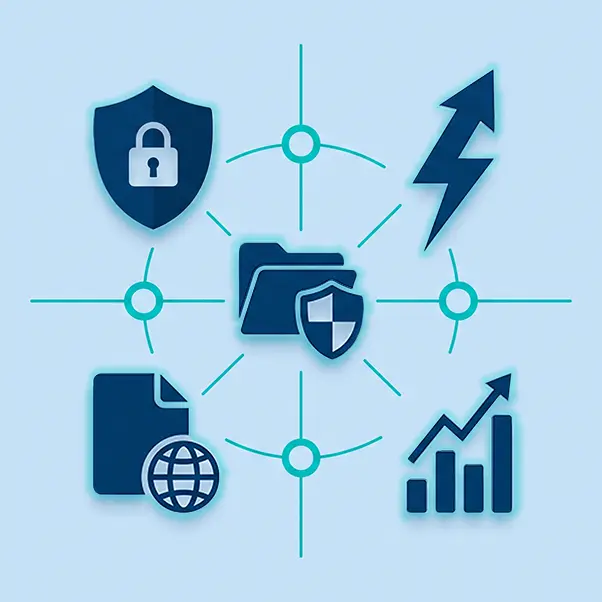
We do more than just move your data. We provide the security and professional control you need to protect your brand’s reputation and trust. Security and Privacy:Secure your files with AES-256 encryption during upload, storage, and download. By setting a password for your transfer, you ensure your data stays protected both in transit and at rest with complete access control.
High-Speed Transfers:Move your largest assets without restrictions. Our platform handles high-volume data transfers reliably, so you get the expanded transfer limits you need without slow speeds.
Custom Domain and Branding:Use your own custom domain to share files with clients and partners. This removes third-party branding and ensures every link you send reinforces your professional identity.
Detailed Transfer Analytics:Track views and downloads by location and time. Access a complete overview of file counts, total size, and expiration dates to stay informed on every transfer.
How UpLink Files Works
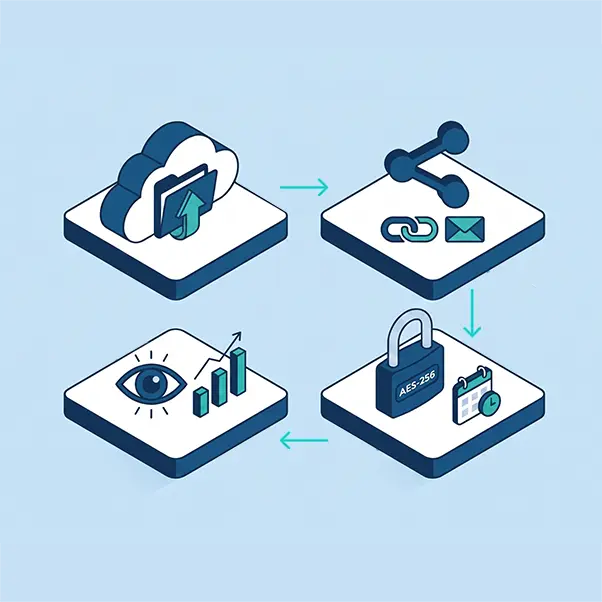
Send your professional assets in seconds. Our simple four-step process gives you complete control over your data. Upload Files or a Folder:Upload your files or a whole folder to transfer. No account needed to start.
Share by Email or Link:Send the transfer link directly to recipients via email or copy a secure link to share yourself.
Set a Password and Expiration:Protect your transferred files with a password and set the custom expiration date.
Track Views and Downloads:Access your transfer overview to see when your transfer is viewed or downloaded.